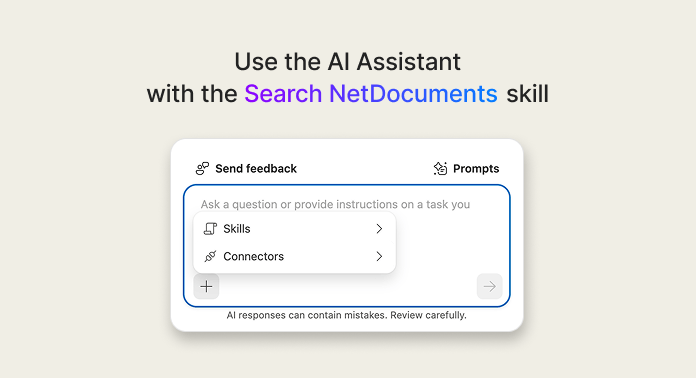
Find Your Firm's Prior Agreement with Smart Answers

Start from language your firm has already used.

Smart Answers is part of the Legal AI Assistant, available with ndMAX Enterprise. If you don't see it, ask your administrator.

Find the agreement in three steps

1

Confirm Search NetDocuments is on

Select “Ask AI” next to the search bar to open the Legal AI Assistant, then select the tool icon in the bottom-left corner of the chat window. A checkmark beside “Search NetDocuments” means Smart Answers is on. If you turned it off earlier, select “Search NetDocuments” to turn it back on.
2

Describe the agreement you want

Name the agreement type, the client or party, the jurisdiction, and a date range. Then send your question. Try it: Find [agreement type] agreements for [client or party] governed by [state] law between [year] and [year]. List each agreement with its parties, date, and key provisions.
3

Verify the documents it found

Each citation in the answer points to the section of the document it came from. Under “Sources,” select the three dots (...) next to an agreement. Choose “Open” to read it, “Preview” for a quick look, or “View Profile” to see its details.

Prompts to try

Search by author

Use this when you remember who drafted it.
Find [agreement type] agreements that [attorney name] created.
Copy prompt to clipboard

Search by date

Use this when you remember roughly when it was created.
Find [agreement type] agreements created around [month and year].
Copy prompt to clipboard

Search by what you remember

Use this when you remember a detail from the text.
Find the [agreement type] with [party name] that includes [a term or provision you remember].
Copy prompt to clipboard

Smart Answers finds strong candidates, and the citations take you straight back to where each answer came from. It reads a limited number of documents, so for a complete list of every agreement that meets your criteria, use standard search.

Learn more

Expert Office Hours

mondays
8am PST / 11am EST
wednesdays
12pm PST / 3pm EST
Sign up